Shopify's New API Rate Limits 2026: What Developers Need to Know
Shopify's 2026 API changes introduce stricter rate limits with cost-per-request quotas. Learn 5 strategies for webhooks, caching, and bulk operations to build resilient apps.
Shopify's 2026 API changes introduce stricter rate limits with a cost-per-request daily quota. Apps now face queuing and outright rejections when limits are exceeded. The fix? Prioritize webhooks, implement aggressive caching, use batching, and build robust rate-limit handling into your architecture from day one.
The Change: What's New in 2026
Understanding Cost-Based Rate Limiting
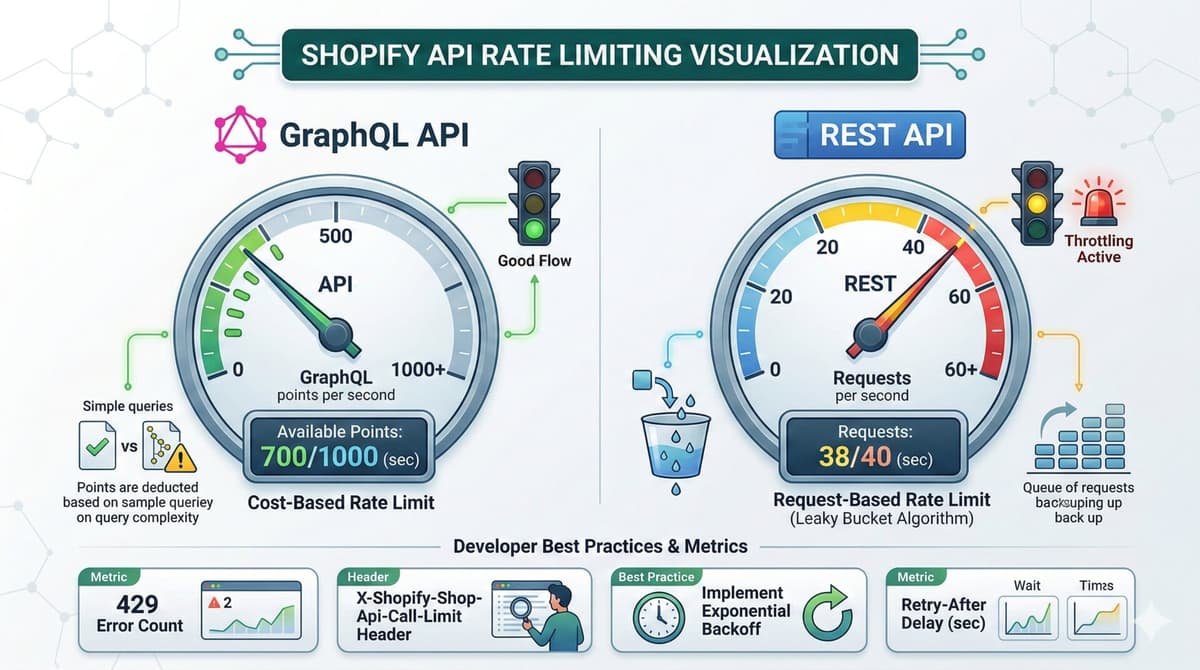
The traditional "leaky bucket" approach is evolving. Under the new system, each API call costs "points" from your daily quota. Simple GET requests cost less, complex mutations cost more, and bulk operations scale based on items processed.
When you hit limits: 80% triggers warnings via response headers, 90-100% enters queue mode briefly, and >100% results in hard rejection with 429 status codes and retry-after headers.
Why This Matters for Your Shopify Apps
The shift from soft throttling to hard rejections changes how apps must behave. Before: Apps could burst through limits and gracefully slow down. Now: Apps must proactively manage quota or face complete failures.
This is particularly critical for migration tools processing thousands of records, sync apps handling real-time inventory, analytics platforms polling data frequently, and multi-shop apps across hundreds of merchant stores.
Best Practices: 5 Strategies for Rate-Limit-Resilient Apps
1. Prioritize Webhooks Over Polling
The golden rule: If you can use webhooks, don't poll. Instead of fetching data every 5 minutes, subscribe to events like products/create, products/update, orders/create, and inventory_levels/update. Webhooks push data to you instantly without consuming API quota.
2. Implement Aggressive Caching
Cache data that rarely changes. Store shop configuration, product metadata, collection structures, and app configuration using Redis with appropriate TTL values. A well-designed cache can reduce API calls by 80-90%.
3. Batch Operations Efficiently
Use GraphQL bulk mutations instead of thousands of individual mutations. Bulk operations are perfect for initial app setup, catalog imports, mass price updates, and data migrations. They process thousands of items in a single quota-efficient operation.
4. Build Rate-Limit Awareness Into Your HTTP Client
Monitor X-Shopify-Shop-Api-Call-Limit headers on every request. Implement 429 status handling with retry-after support using exponential backoff. Track quota usage in real-time and throttle proactively before hitting limits.
5. Implement Adaptive Rate Limiting
Use token bucket algorithms to anticipate limits rather than just handling rejections after they occur. Track quota usage percentage and implement automatic throttling at 70%, 85%, and 95% thresholds to prevent hard rejections.
Monitoring: Know Before You Hit Limits
Build a rate limit dashboard tracking daily quota usage percentage, peak usage hours, endpoint distribution, and webhook vs polling ratio. Set alert thresholds at 70% (yellow), 85% (orange), and 95% (red) for proactive intervention.
The Bottom Line
Shopify's 2026 API changes aren't a punishment — they're a nudge toward better architectural patterns. Apps that embrace webhooks, cache intelligently, and batch efficiently will thrive. Those that don't will hit walls. The developers who adapt fastest will have a competitive advantage. Start auditing your API usage today.
How I Would Audit This
I debug Shopify rate limits by API surface. REST Admin API is request-based. GraphQL Admin API is cost-based. Treating both as simple requests per second is how sync jobs fail in production.
- Identify whether the job uses REST, GraphQL Admin, Storefront, or a specialized API.
- Log throttle headers or GraphQL throttleStatus.
- Reduce selected fields before adding sleeps.
- Use bulk operations for large exports.
- Make retries respect capacity instead of retrying immediately.
Production Failure Modes
Most rate-limit bugs appear after a client catalog grows. A script that worked for 200 products starts failing at 20,000 because it loops through products, variants, inventory, and metafields without pagination or cost control.
- Per-product API calls inside nested loops.
- GraphQL queries selecting full nested objects for sync jobs.
- Retrying 429 responses without waiting.
- Ignoring Plus/Advanced plan differences.
- Running multiple workers for the same app/store bucket.
Copy/Paste Starting Point
const cost = data.extensions?.cost?.throttleStatus;
if (cost && cost.currentlyAvailable < 100) {
  const waitMs = Math.ceil((100 - cost.currentlyAvailable) / cost.restoreRate) * 1000;
  await new Promise((resolve) => setTimeout(resolve, waitMs));
}
The exact threshold depends on the job, but the pattern is the point: inspect capacity, then wait based on restore rate instead of guessing.
What I Would Ship First
I would ship a throttle-aware client before optimizing individual queries. Without shared rate-limit handling, every developer adds their own sleep and the app becomes unpredictable.
- Centralize Shopify API calls.
- Log requested and actual cost.
- Cap concurrency per shop.
- Move exports to bulk operations.
- Add alerting for repeated throttle events.
Sources I Would Check Before Updating This Again
- Shopify API limits: https://shopify.dev/docs/api/usage/limits
- REST Admin API rate limits: https://shopify.dev/docs/api/admin-rest/usage/rate-limits
My Shopify review angle
When I would review this in a client Shopify store, I would start with the operational surface instead of the headline. Shopify's New API Rate Limits 2026: What Developers Need to Know only becomes useful when the reader can map it to a theme file, app setting, Admin API job, checkout rule, or storefront behavior they can actually test.
I would not leave this as theory. I would apply it to one actual page, integration, bug, or client decision and keep the evidence beside the recommendation.
Pre-launch Shopify checks
- Check the exact Shopify surface before changing code.
- Test with products that have missing images, long variants, empty metafields, and unusual prices.
- Confirm the change is visible in server-rendered HTML where SEO/AEO matters.
- Keep a rollback path for app or theme changes.
- Write a handoff note so the merchant team knows what can be edited safely.
Edge cases in the store
- The article sounds correct but does not explain what to edit in Shopify.
- The guidance ignores app conflicts, API versions, or messy product data.
- The change helps desktop screenshots but hurts mobile checkout.
- The page makes a claim that is not backed by visible content or schema.
Merchant handoff block
Implementation check for Shopify's New API Rate Limits 2026: What Developers Need to Know:
1. Confirm the Shopify surface involved: theme, Admin API, checkout, app, or storefront.
2. Test with messy catalog data, not only a demo product.
3. Verify permissions, API version, and rollback path.
4. Record the production edge case this change protects.
A short review block like this is often enough to catch the gap between a nice idea and a safe production change.
Where I would add more proof
I would keep improving this page by replacing any remaining abstraction with artifacts from actual work: test output, screenshots, metrics, source references, or before/after notes.
Want this built for you instead of DIY?
I'm Karan — a Top Rated Plus Shopify Expert ($300K+ earned, 100% Job Success). If you'd rather hand this to someone who's done it hundreds of times, let's talk.
Tags
📬 Get notified about new tools & tutorials
No spam. Unsubscribe anytime.
Comments (0)
Leave a Comment
No comments yet. Be the first to share your thoughts!