Shopify cartToOrderCopyable: The End of Cart Attribute Hacks
Shopify just shipped cartToOrderCopyable — automatically copy cart metafields to orders at checkout. No more webhook hacks, cart attribute workarounds, or note field parsing. Here's how to use it.
The Old Way Was Painful
Here's how developers have been handling this for years:
Cart Attributes — the go-to hack. You'd stuff data into cart.attributes, which are just untyped key-value strings. Any app could read or overwrite them. No validation, no permissions, no structure. It worked, but it was messy.
Note Fields — another classic workaround. Dump everything into the order note and hope your fulfillment team could parse it. Not exactly scalable.
Custom Webhooks — listen for orders/create, intercept the data, and manually write it where it needs to go. Fragile, adds latency, and breaks when webhooks fail (which they do).
Checkout Extensions — better, but still required custom code to bridge the cart-to-order gap.
Every Shopify developer has their own variation of these hacks. I've implemented all of them across 200+ stores. None of them felt right.
Enter cartToOrderCopyable
As of API version 2026-04 (released February 4, 2026), Shopify introduced the cartToOrderCopyable capability for order metafield definitions.
The concept is dead simple:
- Create an order metafield definition (e.g.,
custom.gift_message) - Enable the
cartToOrderCopyablecapability on it - Set the cart metafield with the same namespace and key via the Storefront API
- When the customer checks out, Shopify automatically copies the value to the order
That's it. No webhooks. No post-purchase flows. No middleware. Shopify handles the heavy lifting at checkout completion.
How to Set It Up
Step 1: Create the Order Metafield Definition
Use the GraphQL Admin API to create an order metafield definition with the capability enabled:
mutation {
  metafieldDefinitionCreate(definition: {
    name: "Gift Message"
    namespace: "custom"
    key: "gift_message"
    type: "single_line_text_field"
    ownerType: ORDER
    capabilities: {
      cartToOrderCopyable: {
        enabled: true
      }
    }
  }) {
    createdDefinition {
      id
      name
    }
    userErrors {
      field
      message
    }
  }
}
You can also configure this via your app's TOML file:
[metafields.custom.gift_message]
name = "Gift Message"
type = "single_line_text_field"
owner_type = "ORDER"

[metafields.custom.gift_message.capabilities]
cartToOrderCopyable = true
Step 2: Set Cart Metafields via Storefront API
When the customer enters their gift message (or whatever custom data), use the cartMetafieldsSet mutation:
mutation cartMetafieldsSet($metafields: [CartMetafieldsSetInput!]!) {
  cartMetafieldsSet(metafields: $metafields) {
    metafields {
      key
      value
    }
    userErrors {
      field
      message
    }
  }
}
With variables:
{
  "metafields": [
    {
      "ownerId": "gid://shopify/Cart/YOUR_CART_ID",
      "namespace": "custom",
      "key": "gift_message",
      "value": "Happy Birthday! Hope you love this!",
      "type": "single_line_text_field"
    }
  ]
}
Step 3: There Is No Step 3
Seriously. When the customer completes checkout, Shopify automatically copies the cart metafield value to the order metafield. You can then access it from the order in the Admin API, Checkout UI extensions, or Shopify Functions.
Why This Is a Big Deal
Security
Cart attributes are a free-for-all. Any app installed on the store can read and write them. Cart metafields support app-reserved namespaces and edit/view permissions. Your data stays your data.
Typed Data
Cart attributes are strings. Always. Cart metafields support all metafield types — integers, booleans, dates, JSON, URLs, references. No more parsing strings and hoping for the best.
No More Webhook Dependency
The old webhook approach was fragile. Webhooks can fail, arrive out of order, or be delayed. With cartToOrderCopyable, the data transfer is atomic — it happens during checkout completion, guaranteed by Shopify.
Cleaner Order Admin
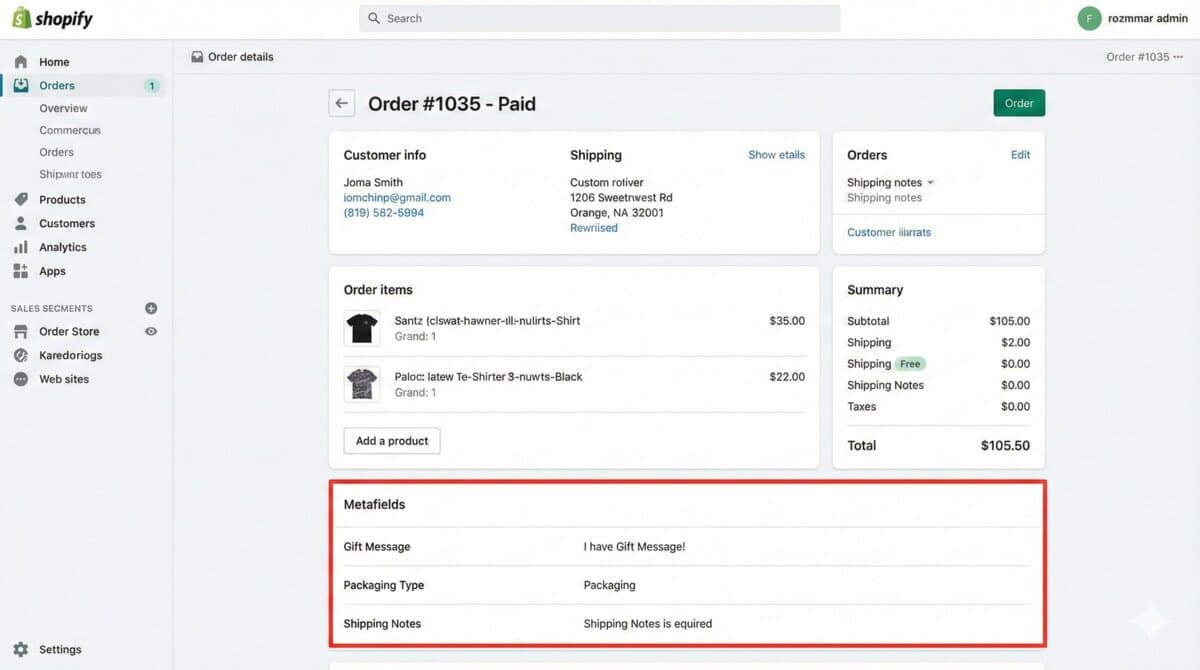
Metafields show up neatly in the Shopify admin order view. No more hunting through note fields or decoding cart attributes.
Real-World Use Cases
- Gift Messaging — No more lost "Happy Birthday" notes
- Delivery Instructions — "Leave at the back door" actually makes it to the order
- Product Personalizations — Engraving text, custom colors, monograms
- B2B Purchase Orders — PO numbers that flow cleanly to fulfillment
- Subscription Preferences — Size, frequency, flavor choices
- Campaign Tracking — Custom UTM or referral data persisted to orders
What About Existing Cart Attributes?
Shopify's official stance is clear: they now recommend cart metafields over cart attributes and checkout metafields for custom data storage.
That doesn't mean cart attributes are going away tomorrow. But the writing is on the wall. If you're building something new, use metafields. If you're maintaining an existing app, plan your migration.
Limitations to Know
- Only works on order metafield definitions (not other owner types)
- Maximum of 25 cart metafields per
cartMetafieldsSetcall - Requires API version 2026-04 or later
- The namespace and key must exactly match between cart and order metafield definitions
- The
cartMetafieldsSetmutation won't trigger Shopify Functions until the next cart interaction
The Bottom Line
This is Shopify saying "we heard you." Every developer who's ever duct-taped cart attributes to order notes is breathing a sigh of relief right now.
The cartToOrderCopyable capability is clean, secure, typed, and automatic. It's how custom data should have always worked in Shopify.
If you're building custom buyer journeys, personalization features, or any app that needs to pass data from cart to order — stop what you're doing and implement this. Your future self will thank you.
Have questions about implementing this in your Shopify store or app? I've been building Shopify solutions for 8+ years — [reach out](mailto:[email protected]) and let's chat.
What are the benefits of using cartToOrderCopyable over traditional cart attribute hacks?
Using cartToOrderCopyable eliminates the need for messy hacks and workarounds, providing a more structured and validated way to transfer custom data from the cart to the order. It also reduces latency and the risk of data loss, making it a more reliable and scalable solution for developers and merchants.
Shopify implementation notes
When I would review this in a client Shopify store, I would start with the operational surface instead of the headline. Shopify cartToOrderCopyable: The End of Cart Attribute Hacks only becomes useful when the reader can map it to a theme file, app setting, Admin API job, checkout rule, or storefront behavior they can actually test.
My review path is simple: connect the advice to one real workflow, make the risk visible, change only what is needed, and keep proof that the change worked.
Store implementation checklist
- Check the exact Shopify surface before changing code.
- Test with products that have missing images, long variants, empty metafields, and unusual prices.
- Confirm the change is visible in server-rendered HTML where SEO/AEO matters.
- Keep a rollback path for app or theme changes.
- Write a handoff note so the merchant team knows what can be edited safely.
Store risks I would test
- The article sounds correct but does not explain what to edit in Shopify.
- The guidance ignores app conflicts, API versions, or messy product data.
- The change helps desktop screenshots but hurts mobile checkout.
- The page makes a claim that is not backed by visible content or schema.
Store QA note template
Implementation check for Shopify cartToOrderCopyable: The End of Cart Attribute Hacks:
1. Confirm the Shopify surface involved: theme, Admin API, checkout, app, or storefront.
2. Test with messy catalog data, not only a demo product.
3. Verify permissions, API version, and rollback path.
4. Record the production edge case this change protects.
This block is meant to force a practical check before code, content, or client advice moves forward.
Next Shopify improvement
To make this stronger over time, I would add proof from the workflow itself: a screenshot, log excerpt, metric table, source link, or concrete QA result.
Want this built for you instead of DIY?
I'm Karan — a Top Rated Plus Shopify Expert ($300K+ earned, 100% Job Success). If you'd rather hand this to someone who's done it hundreds of times, let's talk.
Tags
📬 Get notified about new tools & tutorials
No spam. Unsubscribe anytime.
Comments (0)
Leave a Comment
No comments yet. Be the first to share your thoughts!