Claude Opus 4.8 Developer Guide: Dynamic Workflows, Fast Mode, and Migration Notes
Claude Opus 4.8 is live. This developer guide covers dynamic workflows in Claude Code, fast mode, effort control, 1M context, prompt caching, and API migration notes.

The Short Version
Anthropic launched Claude Opus 4.8 on May 28, 2026. For developers, the release is less about a model-name bump and more about how Claude behaves during long coding sessions, tool-heavy agent runs, and API integrations.
The practical changes to check first are:
- API model ID:
claude-opus-4-8 - Regular pricing: $5 per million input tokens and $25 per million output tokens
- Fast mode: up to 2.5x faster output, priced at $10 input and $50 output per million tokens
- Context: 1M tokens by default on Claude API, Amazon Bedrock, and Vertex AI
- Output: 128k max output tokens
- Effort default:
high - New Claude Code feature: dynamic workflows
- Prompt caching: lower 1,024-token minimum cacheable prompt length
- New API behavior: mid-conversation system messages
- Better long-horizon coding behavior, compaction recovery, and tool triggering
If you build with Claude Code, run agentic coding workflows, or maintain Claude API integrations, these are the changes worth testing before switching production work.

What Actually Changed
Claude Opus 4.8 is an Opus-class upgrade, not a new product category. It builds on Opus 4.7 and is available across the main Claude surfaces.
For developers, the most important launch details are:
| Area | What changed |
|---|---|
| Model ID | `claude-opus-4-8` |
| Coding | Better long-horizon agentic coding and long-context handling |
| Claude Code | Dynamic workflows in research preview |
| Speed | Fast mode available for Opus 4.8 |
| Pricing | Regular pricing unchanged from Opus 4.7 |
| Context | 1M default context on Claude API, Bedrock, and Vertex AI |
| Output | 128k max output tokens |
| Effort | Defaults to `high` on all surfaces |
| Prompt caching | Minimum cacheable prompt length lowered to 1,024 tokens |
| Migration | Opus 4.7 constraints mostly carry forward |
The boring version is "new model, better benchmarks." The practical version is "Anthropic is making Claude better at staying useful across longer, messier work."
That matters more than a single benchmark number. Most AI coding failures do not happen because the model cannot write a function. They happen because the model loses the thread, skips a needed tool call, accepts a bad premise, gets messy after compaction, or finishes with a confident but unverified answer.
Opus 4.8 is aimed directly at those failure modes.
The Benchmark Chart Is Useful, But Not Enough
Anthropic's launch post includes the official capability comparison chart for Claude Opus 4.8. It covers coding, agentic skills, reasoning, and knowledge-work evaluations.
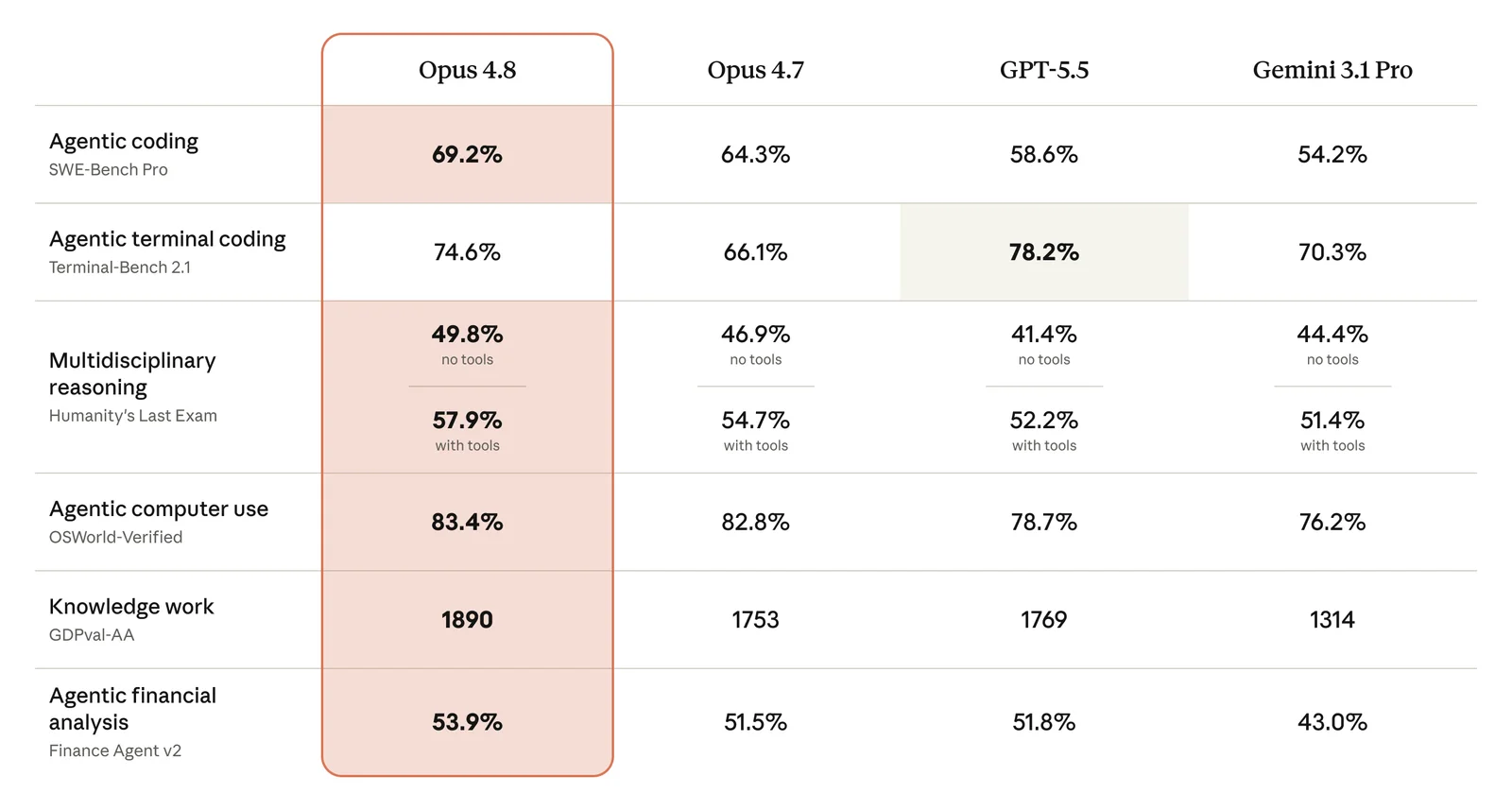
Image source: Anthropic's official Claude Opus 4.8 launch post.
The chart is useful context, but benchmarks are only the starting point. The implementation questions start immediately after the announcement:
- Should I update
modeltoclaude-opus-4-8now? - Will my Opus 4.7 prompts behave differently?
- Does fast mode save time or just increase cost?
- Does dynamic workflows replace my normal Claude Code flow?
- What should I test before using this in a production agent?
- Does 1M context mean I can stop designing context carefully?
Those questions matter more than the launch headline because they decide whether an upgrade is safe, expensive, or actually useful.
Dynamic Workflows Are the Real Claude Code Story
The biggest developer-facing feature is not only Opus 4.8. It is dynamic workflows in Claude Code.
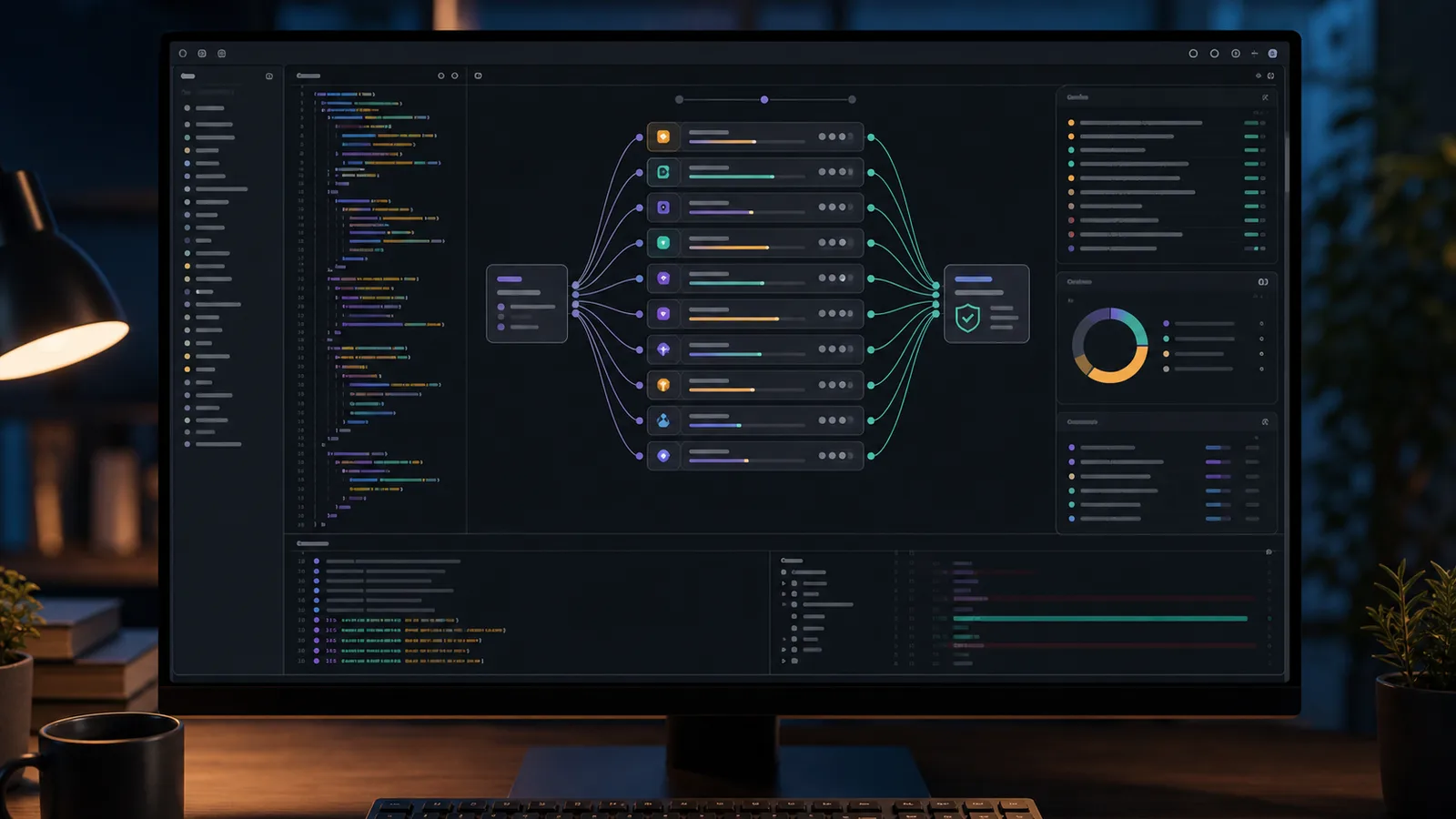
Anthropic describes dynamic workflows as a research-preview feature where Claude can plan a large task, break it into subtasks, run many parallel subagents, verify the outputs, and return one coordinated result.
This is meant for work that is too large for a normal single-agent pass:
- Repo-wide bug hunts
- Security audits across many files
- Framework migrations
- API deprecation migrations
- Large refactors
- Dead-code analysis
- Performance audits
- High-risk changes that need independent verification
That sounds powerful, but it also changes the operating model. A dynamic workflow is not the same thing as asking Claude Code to edit one file. It can consume much more usage, run for much longer, and touch a larger surface area.
A cautious rollout is simple: use dynamic workflows for discovery, migration planning, and broad audits before trusting them with write-heavy repo-wide changes.
Good first prompts would look like this:
Create a dynamic workflow to audit this repository for deprecated API usage.
Do not edit files yet. Return grouped findings, confidence level, affected paths,
and the safest migration order.
Or:
Create a dynamic workflow to review authentication and authorization checks.
Use independent subagents for route handlers, server actions, middleware,
and database access. Report only findings that another pass can verify.
That is where this feature can be genuinely useful. It turns Claude Code from "one assistant with a long context" into something closer to an orchestrated review run.
Fast Mode Is Not Automatically Cheaper
Fast mode for Opus 4.8 is one of the easiest details to misunderstand.
Anthropic says fast mode can produce output up to 2.5x faster. The pricing is also different: $10 per million input tokens and $50 per million output tokens.
That means fast mode is not a blanket replacement for standard mode. It is a latency tool.
Fast mode fits:
- Interactive agent loops where waiting blocks a human
- Short coding turns where response speed matters
- Internal tools where a faster answer improves UX
- Agent orchestration where slow substeps delay the whole chain
Standard mode is usually better for:
- Overnight batch jobs
- Long research runs
- Cheap background classification
- Anything where latency does not affect the user
- Requests that depend heavily on prompt cache continuity across speed modes
One detail from the docs matters for API design: switching between fast and standard speed can affect prompt caching behavior. If you build a fallback from fast mode to standard mode, test the cache and cost impact instead of assuming it is free.

Effort Defaults to High
Claude Opus 4.8 defaults to high effort across surfaces, including the API and Claude Code.
That is a reasonable default for an Opus model. It also means developers should be explicit in production systems.
If you already set effort, your setting should remain in control. If you did not set effort, your app may now be running with Anthropic's default choice for the model.
For production systems, define effort by task class:
| Task type | Suggested effort |
|---|---|
| UI copy rewrite | Low or medium |
| Simple extraction | Low |
| Code review on small diff | Medium |
| Multi-file bug fix | High |
| Migration planning | High or extra |
| Dynamic workflow | Extra or Claude Code `xhigh` style usage |
The point is not to underuse the model. The point is to stop treating all requests as equal.
Migration Notes for API Users
For most Opus 4.7 users, the first migration step is the model ID:
claude-opus-4-8Do not stop there. A real migration checklist should include the behavior and parameter changes around the model.
1. Check Sampling Parameters
Like Opus 4.7, Opus 4.8 does not support non-default temperature, top_p, or top_k in the Messages API.
If your older integration still tunes creativity with sampling parameters, do not just swap the model ID and hope. Move that control into prompts, examples, validation, or task-specific instructions.
2. Use Adaptive Thinking Instead of Old Thinking Budgets
Anthropic's docs continue the Opus 4.7 pattern: use adaptive thinking and effort rather than explicit extended thinking budgets.
The important shape is:
thinking = {"type": "adaptive"}
output_config = {"effort": "high"}
If your code still sets explicit thinking budget tokens from an older Claude integration, test that path before migrating.
3. Review Prompt Caching
The lower 1,024-token cache minimum matters for agentic apps. Smaller prompts that were previously too short to cache may now become cacheable.
That helps if you have repeated system prompts, tool definitions, policy instructions, or long-running agent loops.
It also makes prompt design more important. Cache-friendly prompt structure can reduce cost, but only if your app keeps stable prefixes stable.
4. Use Mid-Conversation System Messages Carefully
Opus 4.8 supports system messages after a user turn, subject to placement rules.
This is useful for long-running conversations where you need to add updated instructions without rebuilding the entire system prompt. For agentic apps, this can preserve cache hits and reduce repeated input cost.
But it should not become an excuse for messy state management. If your app is constantly injecting new system instructions because earlier instructions were unclear, fix the prompt architecture first.
5. Test Refusal Handling
The stop_details object on refusal responses is now publicly documented. This is useful if your app needs to route different refusal types differently.
For example, a developer tool might respond differently to policy refusal, malformed request, or safety-sensitive content. Treat refusal handling as product logic, not just an error string.
What to Test Before Switching
Before moving a serious Claude integration to Opus 4.8, run a small eval set before changing production traffic.
The eval set does not need to be fancy. It needs to represent the work the model actually does.
Test:
- One short task that should not trigger deep reasoning.
- One multi-file coding task.
- One tool-heavy request where skipping a tool call would be a bug.
- One long-context task close to the compaction boundary.
- One refusal or policy-sensitive case.
- One prompt-cache-heavy repeated task.
- One fast-mode request and one standard-mode request.
- One Claude Code dynamic workflow, read-only first.
Then compare:
- Did the model use tools when it should?
- Did it ask better questions before editing?
- Did it preserve style and constraints across the run?
- Did cost change materially?
- Did latency improve where latency actually matters?
- Did any older prompt become too verbose, too cautious, or too willing to push back?
That last point matters. Better judgment can feel like resistance if your old workflow expected the model to obey every instruction without checking whether the plan made sense.
Should You Upgrade?
For Claude Code users, Opus 4.8 is worth testing quickly.
The areas Anthropic emphasizes - long-horizon coding, tool triggering, better compaction recovery, and dynamic workflows - are exactly the areas where Claude Code either becomes very useful or very frustrating.
For API users, the answer is "upgrade after a small eval pass."
If you are already on Opus 4.7, the migration looks manageable. If you are coming from Opus 4.6 or older, pay closer attention to effort, adaptive thinking, and unsupported sampling parameters.
For cost-sensitive workloads, do not assume Opus 4.8 is the default for everything. Keep cheaper models for simple tasks. Use Opus 4.8 where judgment, long context, codebase reasoning, and tool orchestration actually matter.
Where This Fits With My Codex Workflow
This launch also changes how I think about my recent move from Claude Code to Codex.
Codex still fits my daily code-content-publishing loop better. But Opus 4.8 makes Claude Code more interesting again for large repository work, especially if dynamic workflows mature.
A practical split now looks like this:
- Codex for daily implementation, writing, SEO, and image workflows.
- Claude Code with Opus 4.8 for repo-wide audits, migration planning, and second opinions on risky changes.
- Dynamic workflows for read-only discovery first, then tightly scoped write tasks after I trust the pattern.
That is a healthier way to think about these tools. Not one winner forever. Different models and agents for different parts of the work.
Practical Upgrade Checklist
Use this checklist before moving real traffic or serious Claude Code work to Opus 4.8:
- Replace the model ID with
claude-opus-4-8. - Remove unsupported non-default sampling parameters.
- Use adaptive thinking instead of older explicit thinking budgets.
- Set effort intentionally by task class.
- Test standard mode before fast mode.
- Add fast mode only where latency matters.
- Check prompt cache behavior after changing speed or system-message patterns.
- Run a small eval set before production rollout.
- Try dynamic workflows on read-only audits before repo-wide edits.
- Watch usage carefully because dynamic workflows can consume much more than a normal session.
The safest takeaway is this: Claude Opus 4.8 is not only a model bump. It changes how Claude behaves inside long coding sessions and how developers can structure large agentic work. Treat the upgrade like an engineering change: test the behavior, watch cost, and roll it into the workflows where stronger judgment actually matters.
Related Reading
- Why I Moved From Claude Code to Codex for Daily Development
- Claude Opus 4.6: 1M Context Window Goes GA
- Claude Code Remote Control: Code from Your Phone Now Possible
- The AI Coding Paradox: More Speed, Less Skill?
Sources
Want this built for you instead of DIY?
I'm Karan — a Top Rated Plus Shopify Expert ($300K+ earned, 100% Job Success). If you'd rather hand this to someone who's done it hundreds of times, let's talk.
🛠️Generative AI Tools You Might Like
Tags
📬 Get notified about new tools & tutorials
No spam. Unsubscribe anytime.
Comments (0)
Leave a Comment
No comments yet. Be the first to share your thoughts!