Shopify Scripts to Functions Migration: What I Would Audit Before June 30, 2026
A practical Shopify Plus migration checklist for replacing Scripts with Shopify Functions before the June 30, 2026 removal date.
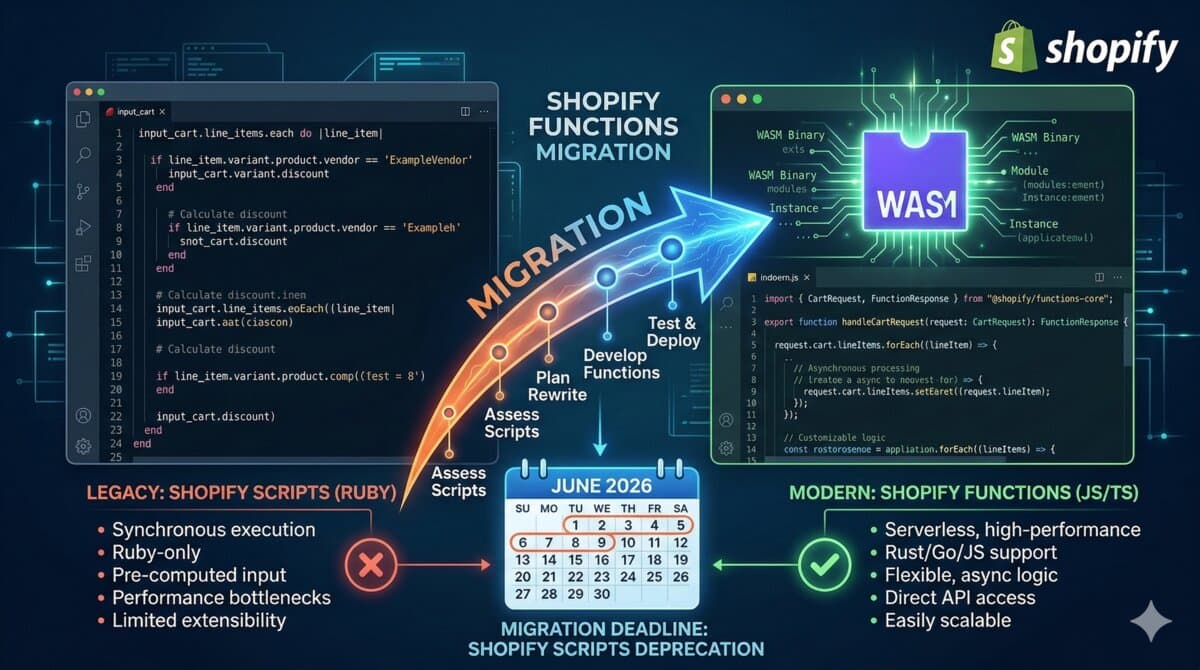
Short answer: every Shopify Plus merchant still using Scripts should inventory the scripts now and decide whether each one becomes an app-based Function, an existing Functions-powered app, a Shopify discount, or a retired customization. Shopify says Scripts need to be replaced before June 30, 2026.
I would not start by porting Ruby line by line. I would start by asking what each script is doing for the business and whether that behavior still belongs in checkout customization at all.

The Audit Table I Build First
- Script name and type: line item, shipping, or payment.
- Business rule owner: merchandising, operations, finance, wholesale, or support.
- Current behavior in plain English.
- Revenue or operational risk if removed.
- Replacement path: native Shopify, app, custom Function, or no replacement.
- Test orders needed before launch.
How I Map Script Types
- Line item scripts usually map to discount Functions, cart transform, or native discounts depending on the rule.
- Shipping scripts usually map to Delivery Customization Functions or shipping profile cleanup.
- Payment scripts usually map to Payment Customization Functions or payment rule configuration.
- Scripts that only hide bad catalog setup should usually trigger catalog cleanup instead of a custom build.
Ruby Script Thinking vs Function Thinking
Scripts trained teams to think in store-specific Ruby snippets. Functions are app-distributed, configured in Shopify admin, and built to be tested and deployed like normal software. That is a better long-term model, but it changes the migration plan.
Old question: can we edit this Ruby script quickly?
Better question: should this rule be a merchant-configurable Function, a native discount, or an app setting?
A Safer Migration Sequence
- Export and document current Script behavior.
- Create fixture carts that represent real edge cases.
- Build or install the replacement.
- Run the Script and Function side-by-side only where Shopify allows it and the interaction is understood.
- Disable one script at a time after testing.
- Keep rollback notes for the launch window.
Edge Cases I Would Test
- Multiple discount codes.
- Subscription products.
- Bundles or cart transforms.
- B2B company pricing.
- International Markets pricing.
- Free shipping thresholds.
- COD or hidden payment method rules.
- Gift cards and non-discountable products.
A migration that passes one happy-path checkout is not done. Scripts usually exist because a store has awkward business rules; those awkward cases need fixture orders.
Sources
- Shopify Help Center, transitioning from Shopify Scripts to Shopify Functions: https://help.shopify.com/en/manual/checkout-settings/script-editor/migrating
- Shopify Functions developer documentation: https://shopify.dev/docs/api/functions
Shopify implementation notes
When I would review this in a client Shopify store, I would start with the operational surface instead of the headline. Shopify Scripts to Functions Migration: What I Would Audit Before June 30, 2026 only becomes useful when the reader can map it to a theme file, app setting, Admin API job, checkout rule, or storefront behavior they can actually test.
My review path is simple: connect the advice to one real workflow, make the risk visible, change only what is needed, and keep proof that the change worked.
Store implementation checklist
- Check the exact Shopify surface before changing code.
- Test with products that have missing images, long variants, empty metafields, and unusual prices.
- Confirm the change is visible in server-rendered HTML where SEO/AEO matters.
- Keep a rollback path for app or theme changes.
- Write a handoff note so the merchant team knows what can be edited safely.
Store risks I would test
- The article sounds correct but does not explain what to edit in Shopify.
- The guidance ignores app conflicts, API versions, or messy product data.
- The change helps desktop screenshots but hurts mobile checkout.
- The page makes a claim that is not backed by visible content or schema.
Store QA note template
Implementation check for Shopify Scripts to Functions Migration: What I Would Audit Before June 30, 2026:
1. Confirm the Shopify surface involved: theme, Admin API, checkout, app, or storefront.
2. Test with messy catalog data, not only a demo product.
3. Verify permissions, API version, and rollback path.
4. Record the production edge case this change protects.
This block is meant to force a practical check before code, content, or client advice moves forward.
Next Shopify improvement
To make this stronger over time, I would add proof from the workflow itself: a screenshot, log excerpt, metric table, source link, or concrete QA result.
For a shorter post, I would add depth through one tested example rather than filler. One good edge case or validation note is more useful than another generic overview.
- One real example from the workflow.
- One edge case that breaks the simple advice.
- One metric or signal to watch after the change.
- One clear action the reader can take today.
One store example to add
For Shopify Scripts to Functions Migration: What I Would Audit Before June 30, 2026, I would keep one concrete example in the page so the advice does not stay abstract. The example should show the starting state, the decision being made, the check I would run, and the signal that tells me the change worked. That makes the content more useful for readers and more defensible for SEO/AEO because it demonstrates practical experience instead of repeating a general claim.
- Starting state: what the store, app, workflow, or codebase looks like before the change.
- Decision point: what the reader needs to choose or fix.
- Validation: the command, screenshot, metric, support ticket, or QA step that proves the change.
- Risk: the edge case that could still fail in production.
- Follow-up: the next improvement I would make after the first pass is stable.
What the merchant should do next
The next step is deliberately small: test the idea on one real example, keep before/after evidence, then decide whether it deserves broader rollout.
Review path for shopify-scripts-to-functions-migration:
1. Pick one real example.
2. Apply the checklist.
3. Record before/after evidence.
4. Watch one metric or failure signal.
5. Keep or revert based on the result.Want this built for you instead of DIY?
I'm Karan — a Top Rated Plus Shopify Expert ($300K+ earned, 100% Job Success). If you'd rather hand this to someone who's done it hundreds of times, let's talk.
🛠️Shopify Development Tools You Might Like
Tags
📬 Get notified about new tools & tutorials
No spam. Unsubscribe anytime.
Comments (0)
Leave a Comment
No comments yet. Be the first to share your thoughts!