Shopify Cache Busting: Why Your ?t= Trick Never Actually Worked
Most Shopify developers use custom query strings for cache busting, but Shopify CDN silently ignores them. Learn why only the v parameter works and how to fix your themes fast.
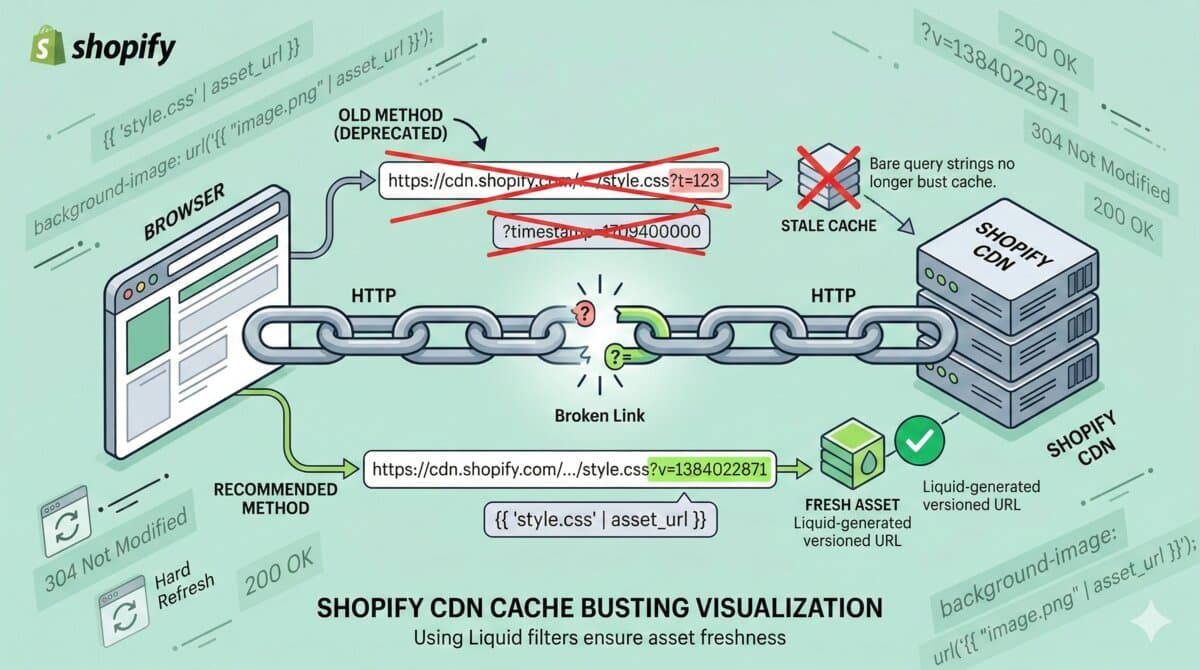
You pushed a CSS update to your Shopify store. Changed a color, fixed a layout bug, maybe swapped out a font. You refresh the page.
Nothing changed.
You hard-refresh. Still nothing. You clear your browser cache, try incognito, ask your client to check — they see the old version too.
Your cache busting isn't working. And it probably never was — you just didn't notice.
The Uncomfortable Truth
Here's something most Shopify developers don't realize: Shopify's CDN only recognizes specific, allowlisted query parameters for cache invalidation. The ?v= parameter works. Everything else — ?t=, ?cache=, ?modified=, bare timestamps like ?1709654321 — is silently ignored.
That means these two URLs serve the exact same cached file:
styles.css?t=1709654321
styles.css?t=1709999999
The CDN strips the unrecognized parameter and serves whatever's cached. Your "cache busting" was never busting anything.
Sometimes it seemed to work because the file was already updated in the CDN, or because you were testing during a window where the cache hadn't propagated yet. But the query string had nothing to do with it.
The Pattern That Never Worked
This is the pattern most developers learned early and used everywhere:
<!-- ❌ This doesn't bust the cache -->
<script src="{{ 'custom.js' | asset_url }}?t={{ 'now' | date: '%s' }}"></script>

<!-- ❌ Neither does this -->
<link rel="stylesheet" href="{{ 'styles.css' | asset_url }}?cache={{ section.id }}">

<!-- ❌ Bare timestamps? Also no -->
<script src="//cdn.shopify.com/s/files/1/0123/theme.js?1709654321"></script>
If you've been appending custom query strings to force-refresh assets, your stores may have been intermittently serving stale CSS and JavaScript — and nobody gets an error message about it. It fails silently.
The Fix: Let Shopify Handle Versioning
Shopify's asset_url filter already does cache busting correctly. It appends a content-based ?v= parameter that changes only when the file itself changes. That's the allowlisted parameter the CDN actually respects.
<!-- ✅ Correct: Shopify handles versioning automatically -->
{{ 'custom.js' | asset_url | script_tag }}

<!-- ✅ Also correct: raw asset_url output -->
<script src="{{ 'custom.js' | asset_url }}" defer></script>

<!-- ✅ For stylesheets -->
{{ 'styles.css' | asset_url | stylesheet_tag }}

<!-- ✅ For images in Liquid -->
<img src="{{ 'logo.png' | asset_url }}" alt="{{ shop.name }}">
The generated URL looks something like:
//cdn.shopify.com/s/files/1/0123/4567/t/1/assets/custom.js?v=1709654321That ?v=1709654321 is a content hash, not a timestamp. It only changes when you actually modify the file. Shopify's CDN recognizes it. Cache busted, properly.
The CSS Trap
Here's one that catches even experienced developers. If you reference images directly in your CSS files:
/* ❌ Static URL — will serve cached version indefinitely */
.hero {
  background: url('hero-bg.jpg');
}

/* ❌ This too — the CSS file itself is static */
.icon {
  background-image: url('/assets/icon-cart.svg');
}
These URLs are baked into the CSS file. They don't go through Liquid, so they never get versioned. If you update hero-bg.jpg, the CSS still points to the cached version.
The fix: Rename your .css file to .css.liquid and use the asset_url filter inline:
/* ✅ Dynamic URL — updates when the image changes */
.hero {
  background: url({{ 'hero-bg.jpg' | asset_url }});
}

.icon {
  background-image: url({{ 'icon-cart.svg' | asset_url }});
}
This only works in .css.liquid files where Liquid is processed. Regular .css files don't support Liquid filters.
5-Minute Theme Audit
Want to know if your theme is affected? Here's a quick audit:
Step 1: Search for Custom Query Strings
Open your theme code editor and search for these patterns:
?t=
?cache=
?modified=
?ver=
?timestamp=
?_=
Also search for patterns like | append: '?' in Liquid files — that's a common way developers dynamically build query strings.
Step 2: Check CSS Files for Direct Image References
Search your .css files (not .css.liquid) for:
url(
url('
url("
Any image reference in a plain CSS file won't be versioned.
Step 3: Check for Hardcoded CDN URLs
Search for cdn.shopify.com in your theme files. Any hardcoded CDN URL with a custom query parameter is suspect.
Step 4: Check App Script Injections
If you've built Shopify apps that inject <script> tags into the storefront, check how they're versioned. App scripts using the Asset API should already use proper versioning, but custom script injections might not.
What About Apps?
If you're a Shopify app developer injecting scripts into the storefront via ScriptTag API or theme app extensions, the same rules apply:
- Theme app extensions: Assets served through the extensions CDN are already properly versioned. You're fine.
- ScriptTag API: The URL you register is served as-is. If you're appending custom query strings for versioning, switch to including the version in the filename instead (e.g.,
app-widget.v2.js). - Liquid snippets: If your app injects Liquid that references assets with custom query strings, update those to use
asset_url.
Why It Works This Way
This isn't a bug — it's by design, and for good reason:
- CDN efficiency: Arbitrary query strings create cache fragmentation. Every unique URL is a separate cache entry, even if the underlying file is identical. This wastes CDN storage and reduces cache hit rates.
- Performance: Higher cache hit rates mean faster page loads for buyers. When the CDN can serve a cached file instead of fetching from origin, the response is ~10-50ms instead of 200-500ms.
- Consistency: By standardizing on
?v=as the version parameter, Shopify can guarantee cache invalidation actually works. - Security: Arbitrary query strings have been used for cache poisoning attacks. Restricting parameters reduces the attack surface.
The Shopify CDN Stack
For context, Shopify's CDN is powered by Cloudflare with:
- HTTP/3 and TLS 1.3 for performance and security
- Brotli and gzip compression (automatic)
- Automatic minification of CSS and JS files
- Speculation rules for prefetching in supported browsers
- ES module shims polyfill for import map compatibility
When you use asset_url, you're plugging into all of this automatically. When you hardcode URLs with custom parameters, you're working against it.
Action Items
- Audit your themes for custom query string cache busting
- Replace with
asset_urlfilter everywhere - Convert CSS files with image references to
.css.liquid - Check any app scripts you inject into storefronts
Your stores might be serving stale files without you knowing. Five minutes of auditing could save you hours of "why isn't my CSS updating?" debugging.
How long does Shopify cache assets?
Shopify's CDN caches assets aggressively — up to a day or more for files without proper versioning. When you use asset_url, the content hash in the URL changes on upload, which forces a cache miss and immediate refresh across all CDN edges.
Want this built for you instead of DIY?
I'm Karan — a Top Rated Plus Shopify Expert ($300K+ earned, 100% Job Success). If you'd rather hand this to someone who's done it hundreds of times, let's talk.
🛠️Shopify Development Tools You Might Like
Tags
📬 Get notified about new tools & tutorials
No spam. Unsubscribe anytime.
Comments (0)
Leave a Comment
No comments yet. Be the first to share your thoughts!